Saturday, 16 February 2013

Exclusive: First Look at Raspberry Pi's Minecraft

I take a first look at Minecraft for the Raspberry Pi and I believe that I have the first actual video of the program in action. You will be impressed at how speedily it works and for an alpha version it is remarkably stable. A very impressive piece of coding.  You will also be pleased to hear that once the file is downloaded you do not need an Internet connection to run it. 

How to install Minecraft

1. To download Raspberry Pi for Minecraft go to:
https://s3.amazonaws.com/assets.minecraft.net/pi/minecraft-pi-0.1.1.tar.gz
2. decompress it: tar -zxvf minecraft-pi-0.1.1.tar.gz
3. Change directory to mcpi (Should be cd mcpi)
4. Either type in: ./minecraft-pi or use the file manager and click on it.

Minecraft controls:
=== KEYBOARD ===
W,A,S,D - Move (navigate inventory)
SPACE - Jump, double tap to start/stop flying, hold to fly higher
SHIFT - Sneak, hold to fly lower
E - Open inventory
1-8 - Select inventory slot item to use
ESC - Show/hide menu
TAB - Release mouse without showing menu
ENTER - Confirm menu selection

=== Mouse ===
Steer - Look/turn around
Left mouse button - Remove block (hold)
Right mouse button - Place block, hit block with sword
Mouse wheel - Select inventory slot item to use


Raspberry Pi is a trademark of the Raspberry Pi Foundation
More details at: http://www.raspberrypi.org/

Friday, 8 February 2013

Teachers Guide to the Raspberry Pi

The Raspberry Pi is a tiny little computer that costs about £30. It can do most things that a computer can do, but its size and the fact that it is very cheap makes it ideal for electronics projects. It was originally designed to be for the education market, but pretty quickly a lot of hobbyists have seen its potential and used it for everything from a small-scale web servers to brewery controllers. This guide is intended for teachers to help get the most from the device and find all the relevant resources.  There will be plenty more educational resources available as people release them.

Getting Your Pi

The Three official supplier are:

You can buy your Pi from a number of outlets and some come with necessary accessories.  If you buy a plain Pi you will need:
1. an HDMI cable and TV or DVI cable to suitable monitor
2. USB Keyboard and mouse
3. 2GB or larger SD Card. (To set up a card, see: http://elinux.org/RPi_Easy_SD_Card_Setup)

Teaching your first lesson with the Pi

Here are the 10 lesson ideas that you might wish to use with a vanilla Raspberry Pi


Programming with Pi

For educational purposes two languages stand out:

There are several books available if you would like something in print:
Enter: RPi for a 40% discount.

Hello World! is another nice book for Python.


Electronics Projects with Pi

This is really where the Pi comes into its own and people have been doing amazing things with the Pi. I wholeheartedly recommend that you have a look at the official Website and forums for examples: http://www.raspberrypi.org/

There are two projects that are really interesting:

  • Pi-Face - By the university of Manchester, simple to use interface
  • Gert Board - Bit more complex, but can get more out of it. Now available assembled. Good tutorial over at Tech Fruits

Other Useful Links


Friday, 4 January 2013

The curse of Operating System Number 6


In the OS world Operating Number 6 would appear to be a cursed number!  Let's take a look shall we.  Firstly let's begin with the Grandaddy! DOS.  It never made it past version number 6, thanks to a new fangled Windows!  It was not the only operating system to suffer under windows and Mac OS 6 was born at a time that it was dripping Market share to Windows 3.  Zeta BE OS version 6 was surrounded by controversy and eventually died the death of the unknown.


About decade later and we have the most famous failure of all... Windows 6!  Don't remember the name, well perhaps that's because they called it Vista.  In fact it was so bad, that Apple Sales people said that they greatest sales tool they had was Vista!  And finally we have iOS 6, which considering the fate of version number 6 of other operating systems isn't so bad, except when it comes to finding anything in the real world!

Still there is one consolation, Unix 6 was the first version to make it outside of Bell Labs and we can be very grateful for that, because not only did it give us Linux, but also Next, which in turn got us OS X.


Friday, 7 December 2012

3 Simple Scratch Tutorials

Here are 3 simple tutorials to get you started in Scratch. You will need a TES login for some of these, but most UK teachers will already have one and it only takes about 30 seconds to enter some details for everybody else. Click on the games to play and download them from the main Scratch Website.

Platformer using minimal code

Really uses very little code and students can spend their time making the perfect platformer.
http://www.tes.co.uk/teaching-resource/Platformer-using-minimal-code-Scratch-6178955/

Scratch Project

Spaceship

Everybody loves to fly spaceships and in this game you get to design a ship and move it around:
http://www.tes.co.uk/teaching-resource/Design-a-Spaceship-and-make-it-move-6113167/

I developed this code into Space Rescue 2 to demonstrate how far Scratch could be pushed:
Scratch Project

Zap Bad Guys

This game is addictive and despite the ridiculously simple graphics, students love to play it. There is plenty of room for expansion both graphically and levels.
http://www.tes.co.uk/teaching-resource/Zap-bad-Guys-Scratch-6170952/ 

Scratch Project

More Tutorials

Great Website with lots of enjoyable games to make.
http://www.eastonhome.co.uk/Scratch/index.htm

Tuesday, 4 December 2012

Green Screen Studio or a TV and Raspberry Pi?

When you have a friend with an OFSTED inspection, hoping to teach an invigorating Maths lesson. You could go out and get a Green Screen Studio, multi-million pounds worth of special effects budget and some professionals in... Or you could leave it to us to knock it up for next to nothing....

So how did we do it?  

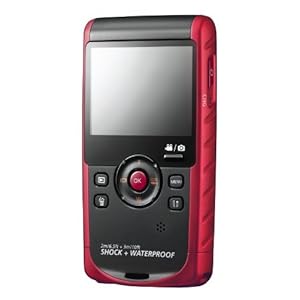
Well firstly, we used a Samsung Camcorder, a script, a nearby television and a video source on a loop. (The Raspberry Pi played the video)   We then edited in some library footage and we had a video ready to go.


Look for yourself, considering the DIY nature of the set-up it performed pretty well and opens up a wide range of applications. Imagine the possibilities for students to film themselves anywhere with anything in the background.

The Maths exercises to go with the video can be found at:
https://drive.google.com/#folders/0B-tNSVgcXSshTWlKSU9hTks3eVU

Monday, 3 December 2012

Game Editors Roundup


It would seem that every time I turn my back there is another games Editor. The classic and probably the one that started the genre is Scratch. Very simple to get started, ideal for primary, but limited in functionality. Scratch  (http://scratch.mit.edu/)

Microsoft then thought they could make one for X-Box and Windows 7 and make it 3d to boot. Kodu was born: http://www.kodugamelab.com/ It's a lot of fun and a great introduction to some of the key concepts, the only real limiting factor is that you can't design your own sprites.

Now the real gap in the market has been to find something that's a bit more substantial than these kits, but not as complicated as a full-blown programming language.

Html 5 based
Tululoo - http://www.tululoo.com/
Construct2 - https://www.scirra.com/

Java based
Greenfoot - http://www.greenfoot.org


App Development
Stencylworks -http://www.stencyl.com/stencyl/overview/
GameSalad - http://gamesalad.com/
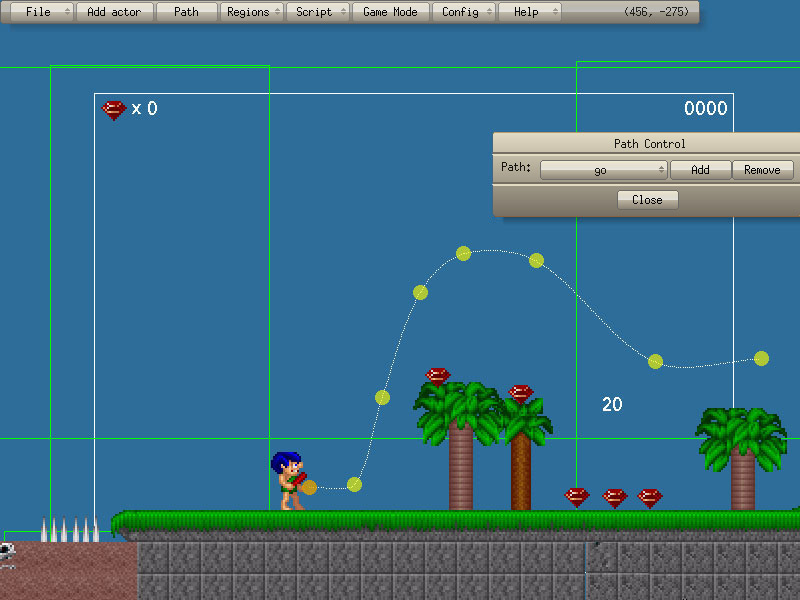
Game Editor - http://game-editor.com/Main_Page
Game Maker - http://www.yoyogames.com/gamemaker/studio

For advanced users we have some very advanced kit, but the catch is that you really need to have at least grasped the basics before tackling a large project.

Programming language
Python & PyGame http://www.pygame.org

3d Games kit
Tool for video game development, architectural visualizations, and interactive media installations
http://unity3d.com/

If you know of more then please, add it in the comments box.


Thursday, 4 October 2012

National Poetry Day: The Computer Swallowed Grandma

THE COMPUTER SWALLOWED GRANDMA
By Valerie Waite, Derbyshire England

The computer swallowed grandma.
Yes, honestly its true.
She pressed 'control' and 'enter'
And disappeared from view.

It devoured her completely,
The thought just makes me squirm.
She must have caught a virus
Or been eaten by a worm.

I've searched through the recycle bin
And files of every kind;
I've even used the Internet,
But nothing did I find.

In desperation, I asked Jeeves
My searches to refine.
The reply from him was negative,
Not a thing was found 'online.'

So, if inside your 'Inbox,'
My Grandma you should see,
Please 'Copy', 'Scan' and 'Paste' her
And send her back to me!

I thought I'd share this little poem in honour of national poetry Day. Students really enjoyed an unusual start to ICT lessons.